How to Use TEXTJOIN Formula in Excel (Video in Khmer) + Tips
Learn how to use TEXTJOIN function in Excel step-by-step to combine text from multiple cells with delimiters and skip blank cells easily.
Hello everyone! Today i will show you how to use TEXTJOIN formula in Microsoft Excel step by step. TEXTJOIN is available in Excel 2019, Excel 2021, and Excel 365.
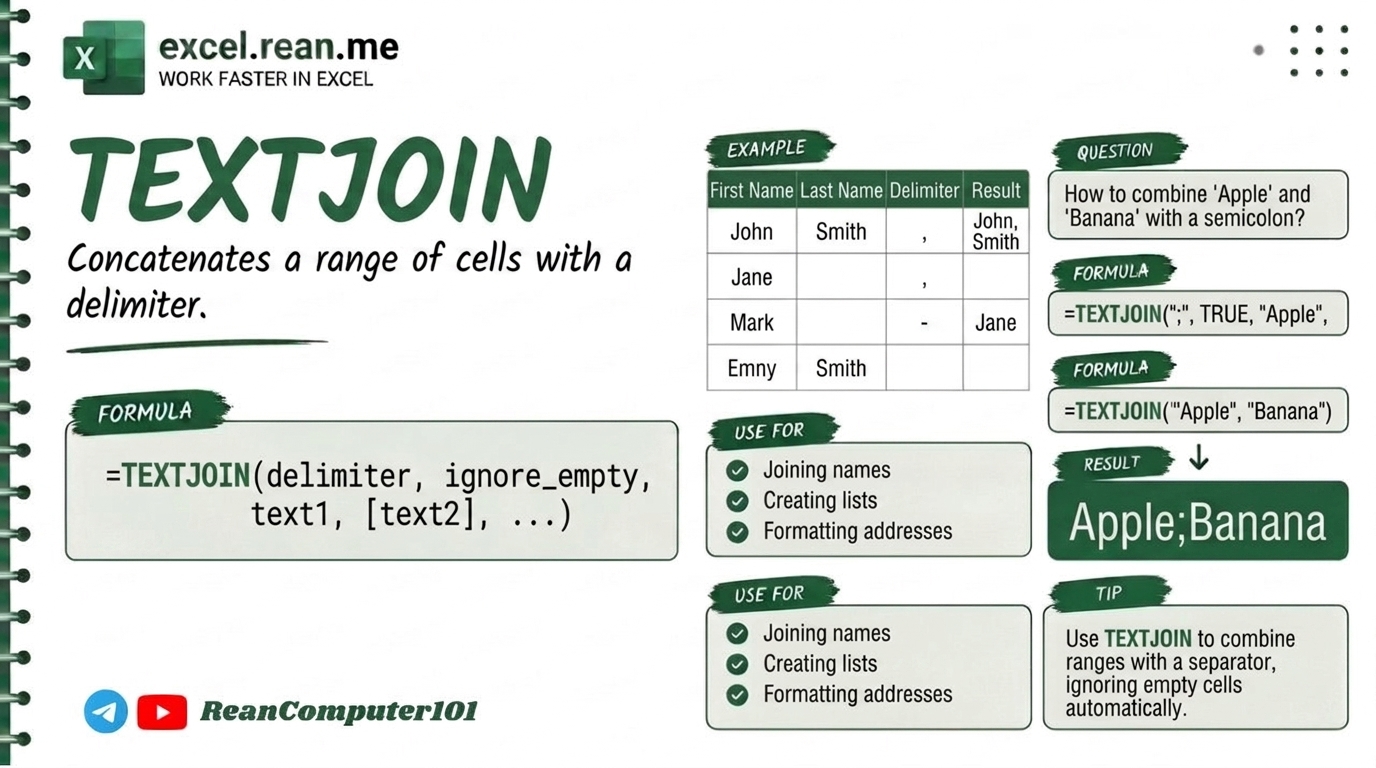
If you have many text cells or range (like first name, last name, address, or items list) and you want to combine them together with separator (like comma ,, space " ", or dash -), TEXTJOIN formula help you very fast and easy! Better than old CONCATENATE because it can skip empty blank cells automatically!
📚 Related Tutorial: Want to connect text without delimiters? Check out How to Connect Text Values in Excel (CONCAT, &)!
🛠️ Formula Syntax & How It Works
=TEXTJOIN(delimiter, ignore_empty, text1, [text2], ...)
delimiter: The separator symbol you want to put between text (example:", "," ","-"). Must put inside quote!ignore_empty:TRUE= Skip blank cells automatically (Recommended!).FALSE= Include empty blank cells.
text1, text2, ...: The text cells or entire range you want to join together (example:A2:A10orA2, B2, C2).
📊 Simple Examples
Example 1: Combine First Name and Last Name with Space
If cell A2 = "John" and B2 = "Smith":
=TEXTJOIN(" ", TRUE, A2, B2)
- Result:
John Smith(combined with space delimiter)
Example 2: Combine List of Items from Range with Comma
If cells A2:A5 contain "Apple", "Banana", "" (empty), "Orange":
=TEXTJOIN(", ", TRUE, A2:A5)
- Result:
Apple, Banana, Orange(ignore blank cell automatically!)
Example 3: Join Words with Hyphen Dash -
If cells A2 = "2026", B2 = "PROD", C2 = "001":
=TEXTJOIN("-", TRUE, A2:C2)
- Result:
2026-PROD-001
💡 Pro Tips for TEXTJOIN Formula
- Always Set
ignore_emptytoTRUE: Settingignore_empty = TRUEprevents extra double commas likeApple, , Orangewhen some cells in your list are empty! - Combine Entire Cell Ranges (
A2:A100): Unlike oldCONCATENATEwhere you must click cell one by one (A2, A3, A4...),TEXTJOINallows selecting full column ranges! - Use Line Break
CHAR(10)as Delimiter: Want combined text on separate lines inside one cell? Use=TEXTJOIN(CHAR(10), TRUE, A2:A5)and turn on Wrap Text in Excel! - Conditional TEXTJOIN with
IF: You can combineTEXTJOINwithIFto join only text that meets condition! Example:=TEXTJOIN(", ", TRUE, IF(B2:B10="Passed", A2:A10, "")). - Join Text and Dates Properly: When joining text with date cells, wrap date inside
TEXT(date, "YYYY-MM-DD")so Excel doesn't display date as serial number.
📚 Related Tutorials
Related Tutorials
Opens in new tab ↗How to Use TEXTBEFORE Formula in Excel + Tips
Learn how to use TEXTBEFORE function in Excel step-by-step to get text before specific delimiter, very easy and useful.
How to Use TEXTAFTER Formula in Excel + Tips
Learn how to use TEXTAFTER function in Excel step-by-step to get text after specific delimiter, very easy and useful.
How to Use REDUCE Function in Excel + Tips
Learn how to use REDUCE function in Excel step-by-step to swap or insert text based on position with simple examples.